Showing posts with label HTML5 Resources. Show all posts

Do You Recognize the 11 Tools Launched for Web Designers in Sep 2014?

In the month of September, there are lots of things that are new for web designers and developers, and it is must for them to check-out those new things in order to learn some new tactics and techniques.

When it comes to talk about those new things, it includes CSS tools, inspiration resources, web apps, software, email templates, jQuery resources, pattern tools, WordPress design, theme, plugin and many more...

Early Launched Designers Tools

All these resources are extremely useful for all the code junkies and web monkeys, and the best thing about these resources is that some of them are free or very low cost, so small and mid-sized businesses can also opt for these tools.

Without wasting your precious time, let’s have a look on these resources that are sure to be helpful for you:


1st Transactional HTML Email Templates

With a comprehensive range of transactional HTML email templates, it would be easy for designers and developers to create various common transactional emails, including password resets, receipts, support requests and many more. These types of templates can work in desktop, mobile phones and web-based email clients.


2nd Shrthnd

Now, Shrthnd is an extremely easy and simple to use CSS shorthand web application as users just need to input their standard CSS as it will output a much smaller version, which a lot simpler to maintain and keeps your stylesheets smaller.


3rd Gravit

A new open source design tool 'Gravit' is currently obtainable as a beta release that provides its users the possibilities of a full-scale design suit. However, it is obtainable in an app-size package.


4th Responsive Web Design Podcast

The all new Responsive Web Design Podcast is co-hosted by Karen McGrane and Ethan Marcotte. One of the best things about this podcast is that they have conducted interviews with people, who have worked on responsive designs for some very important websites like Capital One, Marriott and more.


5th UXPorn

A complete collection of UX inspiration for designers, UXPorn comes with wireframe templates, UI design patterns and a lot more that help designers and developers in their day-to-day task.


6th The Colors of Motion

With the help of The Colors of Motion, users are allowed to break down the color palettes of popular films in a frame-by-frame basis. Being a user-friendly UI, it works incredibly as users just need to click on a film and have to find the frame whose color they like.


7th Go Moodboard

A free moodboard creator 'GoMoodboard.com' allows designers and developers to create and share moodboards on anything they like. They can start with a black board or with one of their templates, but they need to be careful.


8th The Stocks

The Stocks is a free royalty photos from outside the standard stock photo website that serves as a single jumping-off point for a range of stock photo websites.


9th The Starter League

We all know that developing web applications without the help and support is quite difficult, so The Starter League is one such tool that offers you with an expert instruction and mentorship. Paired-up with more than 37 signals in order to offer in-depth information on developing successful web apps, it is a great option for designers and developers.


10th Fibonacci Flexbox Composer

If you are looking to develop a Flexbox layout, the Fibonacci Flexbox Composer is a great option as it exports the HTML and CSS. However, it is not using the Fibonacci sequence in any way in spite of its name.


11th UILang

A UI-focused programming language 'UILang' is a perfect language that especially for web designers to make their work a lot easier. This is one such language that develops overlays, tabs, popovers, galleries and more.


So, these were the new things and resources for web designers and developers in the month of September, 2014. You can use these resources and get huge help in your work to complete it on time.


Comparison Chart of 35+ Awesome Websites to Learn Coding Online

We all know that learn coding is not child’s play as it needs some special expertise and skills that make us capable code intelligently. There are lots of people worldwide, who are looking for learning the best programming languages in order to get started with application development and some other wonderful tasks.

Online code learning websites comparison chart

It doesn’t matter what your age or experience is, you can find plethora of tools and technologies that help you to get started and refine your programming chops. To make learning code easier, here I have listed a comparison chart that can help you to choose the best code teaching website as per your need.

Have a look the comparison chart to get a bird’s eye view of all these awesome places to learn how to code.

Choose The Best Fitted You
No Name/Website Courses Features Pricing Difficulty
1 Codecademy HTML, CSS, JavaScript, jQuery, PHP, Ruby, Python, API Code Interpreter, Progress Saver, Project, Forum Free Easy – Intermediate
2 Develop PHP HTML, CSS, JavaScript, PHP and MySQL Videos, Tutorials Free Easy – Hard
3 Code Avengers HTML5, CSS3, JavaScript Code Interpreter, Progress Saver, Project, Note Free Easy
4 The Code Player HTML5, CSS3, Javascript Videos, Source Code, Code Interpreter Free Intermediate – Hard
5 Code HTML, CSS, CSS3, JavaScript, jQuery, Ruby, Code Interpreter, Progress Saver, Discussion Free Easy – Intermediate
6 Code School HTML5, CSS, CSS3, jQuery, Ruby, Ruby on Rails, iOS Code Interpreter, Screencast, Progress Saver, Forum Free, $25/month Intermediate – Hard
7 Codepen jQuery, CSS, HTML Code Interpreter, Discussion Free Easy – Hard
8 Khan Academy Programming Basics, Canvas Drawing, Animation, User Interaction Code Interpreter, Screencast, Progress Saver, Project, Discussion Free Easy – Intermediate
9 Programmr Android, iOS, jQuery, J2EE, Flash, PhoneGap Project, Contest Participation Free, Signup Need Intermediate – Nightmare
10 Treehouse HTML, CSS, CSS3, JavaScript, jQuery, Ruby, Ruby on Rails, iOS, Android, UX, Database Code Interpreter, Screencast, Progress Saver, Project, Forum Free, $25/month, $49/month Easy – Hard
11 Talent Buddy C, C#, C++, Javascript, PHP, Python, Ruby Code Interpreter, Mobile App Free, Signup Need Intermediate – Hard
12 LearnStreet HTML, CSS, JavaScript, Python, Ruby Code Interpreter, Progress Saver, Project, Forum Free Easy
13 Udacity Web Development, HTML5, Python, Java, Computer Science, Algorithm, AI Code Interpreter, Screencast, Progress Saver, Forum Free Intermediate – Nightmare
14 CodeHS Problem Solving, JavaScript, Animation, Game Programming Code Interpreter, Screencast, Progress Saver Free, $25/month, $75/month Easy – Intermediate
15 Scratch Visual Programming Visual Editor, Project, Forum Free Easy
16 HTML5 Rocks HTML5 Blogs Online, Tutorials Free Hard
17 SQLZOO SQL Code Interpreter Free Easy – Hard
18 Mozila Developer Network HTML, CSS, Javascript Tutorials, Demos, Discussion Free Easy – Hard
19 Learneroo Java, Loops, Strings and Array Tutorials, Discussion Free Easy
20 Koding Hack Ruby, Go, Java, NodeJS, PHP, C, Python, etc. Code Interpreter, Discussion $19 to $99/Month Intermediate – Nightmare
21 Plural Sight Ruby, HTML5, iOS, Javascript Code Interpreter, Videos Free, Signup Need Easy – Hard
22 The New Boston Ajax, C++, Java, PHP, Python, Ruby Videos Free Easy – Hard
23 Udemy HTML5, Java, etc.. Tutorials, Videos Free / Paid Easy – Hard
24 Coursera C++, C#, Python, Java, or Ruby Lecture System Free Easy – Intermediate
25 Learn Python the Hardway Python Videos, Discussion $29.95 Hard
26 Lynda WordPress, jQuery, CSS, HTML, PHP Videos, Code Interpreter, Free & Paid Intermediate – Nightmare
27 Coder Dojo How To Code, Develop Websites, Apps, Programs, Games Tutorials, Videos Free Easy – Intermediate
28 P2PU2 School of Webcraft WordPress, jQuery, CSS, HTML, PHP Communities, Webinars Free Easy – Hard
29 Dev Opera Important Bits of coding languages Discussion Free Hard
30 W3C jQuery, CSS, HTML Tutorials Easy – Hard
31 Bloc iOS, Android, UX Videos, Code Interpreter, Paid Intermediate – Nightmare
32 How to Code WordPress, jQuery, CSS, HTML, PHP Videos, Discussion Free Easy – Hard
33 Developers Google WordPress, jQuery, CSS, HTML, PHP, Mobile Videos, Discussion Free Easy – Hard
34 Learnable HTML & CSS, JavaScript, PHP, Ruby, Mobile Videos, Discussion Free Easy – Intermediate
35 Bento Box HTML & CSS, Git, Flask, Bootstrap, Heroku, etc.. Collections, Tutorials Free Easy – Intermediate
36 Try Git Git Octobox Free Easy – Intermediate

I hope above mentioned comparison chart of best websites from where you can easily learn without any hassle and helps you a lot in coding. If we have missed any website, feel free to share it with us by commenting below!

Your experiences for any of these listed websites are highly appreciated. So don't hesitate to discuss.

Picture: Michael Himbeault/Flickr

10+ CSS3 & HTML5 Tutorials That Make Website Designing A Lot Easier

The job of a web designer isn't easy, and it seems to keep getting more and more complex with each passing day. Between new web standards, new libraries and new tools, it is quite difficult to keep up.

Thankfully, there are lots of great resources obtainable that can help designers to learn various new techniques and ideas.

In this article, I have shared twelve CSS3 and HTML5 tutorial resources covering a variety of web design topics. These different tutorials can help you out in your project of designing, so let’s have a look on these twelve tutorials:


1st CSS3 Responsive Menu

This tutorial teaches you how to build a menu that is responsive, meaning it adjusts to the size of the viewport on desktop or mobile. It isn't as simple as you think, so you'll need to commit some time to understanding the mechanics and reading it carefully before adding the menu to your responsive site, safe in the knowledge that it will look just as good on your desktop website as it does on your mobile website.


2nd HTML5 Canvas Tutorial


HTML5 Canvas

Through this tutorial, one can get complete information on the fundamental drawing capabilities of the HTML5 Canvas, comprising curve and line drawing, shape drawing, images and text, path drawing, gradients, patterns and more.

However, this tutorial also contains information on what applications you can create with HTML5 Canvas, so ensure that before you came across with HTML5 Canvas, you consider this tutorial.


3rd HTML5 Form Input Elements

As we all know that the basic HTML Form Input elements includes Test, Select, Textarea, Radio Button, Checkbox and File Upload and more that served users exceptionally over the years.

If you are looking for new put of HTML5, this tutorial comes with all new input types that have some wonderful functionality built into them. Check-out this tutorial to get more information about HTML5 form Input elements and make your website more attractive.


4th HTML5 Form Input Attributes

Along with the input, HTML5 also come with lots of other attributes that can be used to modify the behavior and operation of forms. Using all new attributes and inputs, website designers are able to create forms that are smarter, simply using HTML no matter whether they have experience or not.

In this tutorial, you can find in-depth information about HTML5 Form Input Attributes that are recently introduced by the company. In short, we can say that this tutorial explains the rest of the new attributes and shows how they are useful.


5th HTML5 Geolocation


HTML5 Geolocation

We all know that there are lots of techniques obtainable when it comes to recognize the user’s location, and mainly, Wi-Fi and IP based techniques are extremely common among desktop browsers and GPS, A-GPS and Wi-Fi techniques are used by mobile browsers.

This tutorial contains huge information on HTML5 Geolocation like it can be used and how it will be helpful to provide location based information or route navigation details of the user.


6th Accordion with CSS3

You may create a fancy accordion menu using this tutorial. You may go as creative or as elegant as you wish, and the tutorial will show you how. It is a nice way of adding something a little more special to your website. So, check-out this tutorial that provides huge information about accordion with CSS3.


7th Create a Stunning Menu in CSS3

This is one of my personal favorite tutorials for creating a slick navigation menu using only CSS3. It doesn't require any JavaScript and images for decorating website as it includes a great icon font with some character to menu option.


8th HTML5/CSS3 Gray Navigation Menu


HTML5/CSS3 Gray Navigation Menu

Taking help of this tutorial, you can simply create navigation menu that has cross-browser functionality and was optimized for IE7 and above. This menu is totally created in HTML5 and CSS3 without using images.


9th Responsive Navigation Menu

This is the best tutorial on Responsive Navigation Menu as it provides information on new technique that can be used to produce a responsive menu without having to use JavaScript. Website designers can developers can get information on how menu can be aligned left, center and right, so make your website designing and developing extremely easy with this tutorial.


10th Illusion of Stacked Elements with CSS3

Many of you all are familiar with the use of the before and after pseudo elements so that you can do some interesting effects with CSS. In this tutorial, you can find information on how you can develop a simple stacked look to some images. So, go through this tutorial and get in-depth information about Illusion of Stacked Elements with CSS3.


11st HTML5 Audio player with Playlist

There are lots of people, who are facing the task of developing audio player, but some are simply selecting one of the obtainable players like flash player. But, if you are looking to develop your own audio player that works wonderfully on mobile devices, this tutorial is completely best as it allows you to get in-depth information about how to develop your own audio player.


12nd How to use HTML5's Drag and Drop?


HTML5's Drag and Drop

Using CSS3, you are able to create a tabbed navigation menu. It gives you instruction on how to create and install tabbed navigation into your website. It also includes tutorials on the additional extras such as text shadowing or box shadowing.


13th HTML5 Periodical Table


HTML5 can be sometimes overwhelming, but once you've mastered it, you can do a whole lot of stuff. That's why WebsiteSetUp.org came up with an HTML5 Periodic Table (developed by Robert Mening) to provide a visual reference to Web Developers.


So, these are 13 best and wonderful CSS3 and HTML5 tutorials that web designers can use to make their task of designing a lot easier. To get more information on HTML 5 development or CSS3 development, you can click here.


Easy Animation with 10 Worthy HTML5 Animation Tools

Want to make your websites visually stunning and creative? Every webmaster has an aim to create fantastic HTML5 animations for your websites, no matter how much it costs. However, producing such animations is a bit difficult and consuming process. Below given fantastic collection of animation tools helps developers to create HTML5 animations for your websites to make your site stunning.


1st Google Web Designer

Easy Animation with 10 Worthy HTML5 Animation Tools

Google Web Designer is the latest tool of Google that used for developing an interactive HTML5 sites and ads. This tool is a modern WYSIWYG, where developers don’t require jumping into the code, but also getting the output and tools that are design-oriented. Developer will find generated code and can simply be edited or tweaked and the result is showed automatically. Along with tool, you will find ready-to-use settings for designing Google-powered ads like AdMob, DocubleClick, and so on.

Above mentioned are 10 worthy HTML5 Animation Tools that makes your animation easy and attractive. If you have found some latest one, then let us know through comment section.


2nd TweenJS


TweenJS Animation Tool

TweenJS is one of the simplest tweening libraries that used in JavaScript. This library was created to incorporate excellent with the EaselJS library, but not dependent on or particular to it. TweenJS library supports tweening of CSS style properties and numeric object properties both. Its API is straightforward yet very powerful to develop tweens by chaining commands.


3rd Adobe Edge Animate


Adobe Edge Animate Animation Tool

Adobe Edge Animate is one of the best motion and interaction tools for producing animated, interactive content by using CSS, JavaScript and HTML. Edge Animate comes with precise control over motion graphics and HTML elements with a video-editor-like timeline interface. Content created with Edge Animate works excellent on mobile devices that run on Android or iOS and modern desktop browsers as well. This tool includes features like Down-level browser support, Multiple publishing options, Web font services support, CSS filter support, Digital publishing support and so on.


4th HTML5 Maker


HTML5 Maker Animation Tool

HTML5 Maker is an excellent animation service/tool for creating animated, interactive content with the help of HTML5, HMTL, JavaScript and CSS. It supports all the latest text filters and thus, you don’t require using Photoshop to create attractive text. Being a simple to use tools, it also gelps to achieve remarkable outcomes by creating cross-browser animated content like Slideshows, Presentations, Sliders, JavaScript and html5 animation, and so on.


5th Motion Composer

Motion Composer Animation Tool

Motion Composer is a must have tools for the professionals and prosumers as it constructs the difference between professional and novice web designers. One shouldn’t require using any code for creating animation. With the help of clear UI, you can simply create beautiful animations effortlessly. This tool publishes your created content to any smartphone, computer, tablet, etc. Furthermore, you can also integrate audio to your animation and make it more impressive.


6th Animatron


Animatron Animation Tool

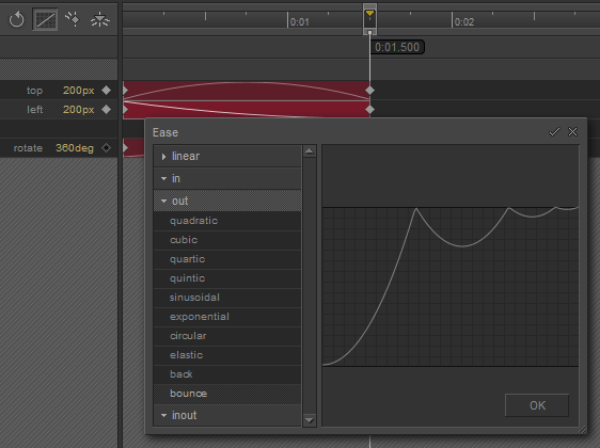
Being a simple tool, Animatron can create stunning HTML5 animations and interactive content in your browser. Users can have the intuitive Animatron Editor for designing and publishing banners, movies and infographics that play everywhere, from desktop to mobile devices. Animatron doesn’t required any coding knowledge. Moreover, it enables you to team up with other users, create custom shapes, import artwork and draw directly within the tool.


7th Motion Canvas


Motion Canvas Animation Tool

Motion Canvas is a complete HTML5 Canvas animation system that enables designers to produce vivid drawings. With this tool, designers can easily design shapes, text rendering and bezier curves (pen tool) to create interactive masterpieces. Motion Canvas offers easy animation functionality and delivers industry-standard key-frame animation system. Its animation can run on iPhone, Android and Win7 phones and is compatible with Firefox8+ or IE9+.


8th Purple Animator


Purple Animator Animation Tool

Purple Animator allows creating beautiful HTML5 animations effortlessness. Created animation with Purple can be seen on mobile devices and on your Desktop. This tool imports assets directly from graphics applications such as Pixelmator, Adobe® Photoshop® and so on and starts producing once. Preview animations created with Purple on the iPad makes you apps, sites, game, more existing.


9th Nodefire


Nodefire Animation Tool

NodeFire is a commendable responsive focused HTML5 animator for sites that follows mobile, desktop, tablet devices while in design more. The best thing about this tool is it creates only one animation that responds to fit various environments. NodeFire is blessed with unparalleled animation and interaction features


10th BLYSK


Google Web Designer Animation Tool

BLYSK is considered as one of the most powerful tools for producing HTML5 animations. It is based on a timeline that makes your job much easier, just like Adobe Edge and Tumult Hype. This tool has a combined power of HTML5, CSS3 & JavaScript that delivers possibility of creating animation like old tools, but without any plug-ins. Users have to use in-cloud image library or use built-in tools for drawing anything they want without installing anything.


Top 5 HTML5 Mobile UI Frameworks For HTML5 Powered Apps

Increase in demand of HTML5 Mobile User Interface Frameworks results into more number of HTML5-powered Apps. HTML5 Mobile UI frameworks are nothing but libraries that help developers to develop a professional grade user experience for applications.

html5 mobile UI framework

Such libraries include one or more than one files that written using JavaScript and CSS. That means such files are meant to be included in an HTML file. In this post, we have collected 5 outstanding HTML5 Mobile UI Frameworks that help you for front-end web development. Even I think, you will have helpful tips to use app framework for developing HTML5 mobile app so found the best. Go through this post and gather essential information.


1st Kendo UI

Kendo UI Framework

Based on jQuery, Kendo UI is a commercial venture that supports the outstanding documentation and tools available for developers. Having Kendo UI’s theme builder, one can easily helps developers to cook up a custom color scheme for their UI.

HTML with class tags to run "widgets" are used in Kendo UI’s Mobile HTML5 library that delivers a set block of functionality. Using Kendo UI also allows changing its UI based on the platform for emulating the native aesthetic of an iOS, Windows Phone 8, Android, or Blackberry device. The Hybrid App builder Icenium also uses it.

● HTML based

● Native look depending on mobile platform

● Fast with SVG support, plus fallback support for older browsers

● Complete package, framework, UI and MVC all in one

● Great documentation

● Great template system, themes are native like, depending on platform (iOS, Android …)


2nd Twitter Bootstrap 3

Twitter Bootstrap 3 UI framework

Twitter Bootstrap 3 is one of the latest in a series of HTML5 UI Frameworks that works well for desktop browsers as well as mobiles. This framework is based on manipulating HTML5 elements and delivering specific CSS styles to create an application.

The Twitter Bootstrap Website also allows developers to add customized style and JavaScript components for enhancing its functionality. One of the best things about Twitter Bootstrap 3 is it contains a distinctive "Web 2.0" look for giving modern and crisp look, however, it doesn’t support JavaScript scrolling or animated transitions.

● New design and an optional theme

● Rewritten JavaScript plug-ins

● Super-powered grid system

● Brand new Customizer

● Cross-Browser Compatibility


3rd TopCoat

TopCoat UI framework

Built by Adobe, TopCoat is a free HTML5 Mobile UI framework that relies on CSS libraries over JavaScript to deliver every developer’s requirements. This framework is much stylish from others and allows easy to build using HTML5 elements that delivers an edge in speed.

Those who are a fan of Adobe’s aesthetics won’t be disappointed by TopCoat. Moreover, it’s designed primary for desktop browsers, but also has a mobile stylesheet that contains larger touch targets for controls.

● Custom builds for themes and hacks

● Free HTML5 Mobile UI framework

● Social sharing icons for all of the major networks

● Mobile Stylesheet With Larger Touch Targets


4th jQuery Mobile

jQuery Mobile UI framework

jQuery Mobile is the most commonly used HTML5 Mobile UI Framework that provides a mobile user interface, reflecting the same aesthetic and usability of its desktop product although it is not really created for the mobile space.

This HTML5 Mobile UI Framework is simple to use as it is programmed by using HTML elements just like the previous two frameworks. jQuery Mobile also blessed with a large installed base that delivers help and sample code for latest projects.

● Incorporating predesigned layout, control, and widget elements

● Easy to learn and Quick to Iterate

● Avoid App Store Approval Madness & Debug Build Hell

● Cross-platform & cross-device compatible


5th Sencha Touch

Sencha Touch UI framework

Sencha Touch is better known for its high-performance HTML5 mobile application framework that delivers high-quality user experience. Sencha Touch enables developers to develop some outstanding apps for BlackBerry, Windows Phone, iOS, Android, etc.

It delivers a unique take on HTML5 Mobile UI Frameworks as it needs all UI code written in JavaScript. Sencha Touch also supports the Yahoo Query Language and its theme supports every popular mobile platform.

● Themes for every popular mobile platform

● Model–view–controller system

● Easily scales to different resolutions for maximum compatibility

● HTML5 and CSS3 allows higher flexibility

● 50 built-in components


Other than this, there are some other mobile application HTML5 frameworks that help to create marvelous application with lots of features, but this post came to its end. If you think I forget to something, let me know through comment section. You can also share your views as well.

K6WFMSTHRFP7